Fear & Greed Index
0–100A daily snapshot of broad-market sentiment.
—Loading data
—Yesterday—7 days ago—30 days ago
HOSTuvo / CRYPTO INTELLIGENCE
Bybit.com scanning, Order Flow, PRE-MOVE and 4h/1d analysis in one workspace. HOSTuvo connects market data, explanations and learning from outcomes to support your assessment.
Every module in one subscription
 BTCPRICE
 ETHSTRUCTURE
 SOLMOMENTUM
 XRPCONTEXT
Process illustration, not a market signal
ONE MARKET. MANY PERSPECTIVES. SEE THE WIDER PICTURE.
BTCBitcoinETHEthereumSOLSolanaXRPXRP ADACardano
 AVAXAvalanche
Cryptocurrency symbols illustrate the market. They do not imply partnerships.
MARKET CONTEXT
Sentiment, altcoin strength and market share. Three perspectives before your next analysis.
A daily snapshot of broad-market sentiment.
The share of eligible altcoins outperforming BTC over 90 days.
Eligible markets: —
Bitcoin’s share of total crypto market capitalization.
Market context, not a buy or sell recommendation.
HOSTuvo LIVE DATA
Research, track record and embeddable data — public by design.
WHAT IS HOSTuvo?
HOSTuvo is a cryptocurrency market analytics application. It brings different perspectives — from price structure to order flow — into a clear process: find a situation, understand its context, check the conditions.
See where the evidence aligns, what is missing and why the result may be HOLD. The application supports your assessment and does not place automatic orders.
Technical analysis, microstructure, order flow, derivatives and research layers. Each adds a different piece of information; together, they build a fuller picture.
SELF-LEARNING INTELLIGENCE
Crypto markets run around the clock. HOSTuvo is designed for the same rhythm: observing the market, collecting analysis outcomes and using new data in its model-learning process. An analytics workspace with a self-learning engine, built for continuous 24/7 operation.
Learning and validation run in cycles. A new model must pass quality gates before it can influence production analysis. Training alone does not demonstrate better results.
HOSTuvo includes a dedicated hybrid research pipeline for constrained optimization across features, brain combinations and research priorities. Quantum-derived outputs are challenger seeds — never direct trading signals.
Every candidate is compared with classical baselines and must pass chronological OOS / forward validation before it can influence production analysis.WHY HAVE IT IN YOUR WORKFLOW?
Three moments when context makes a difference.
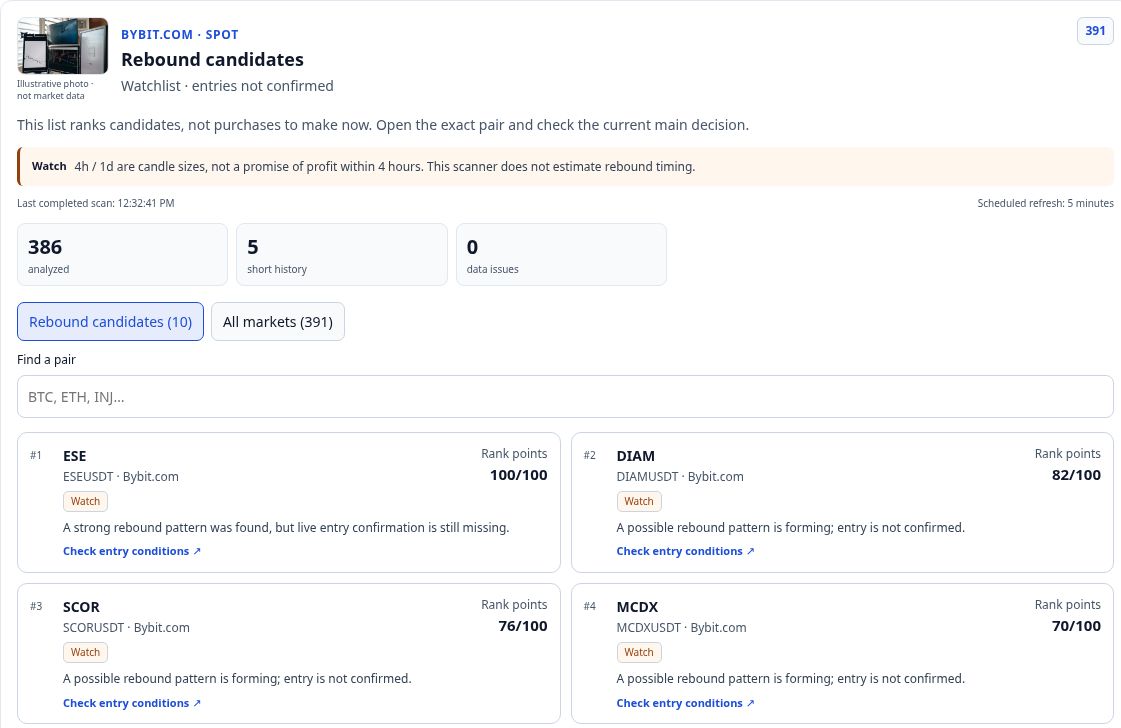
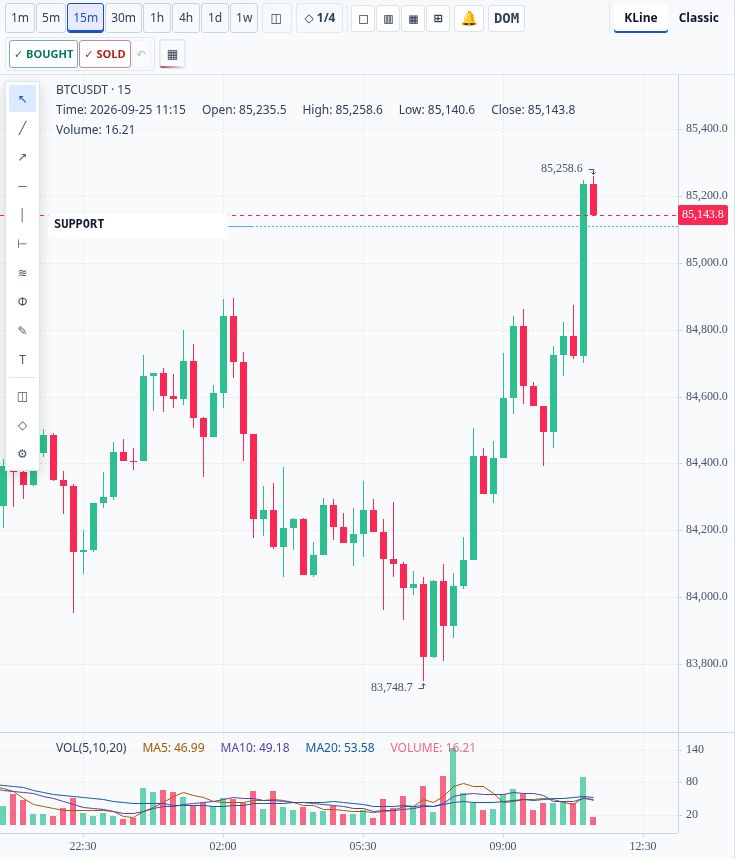
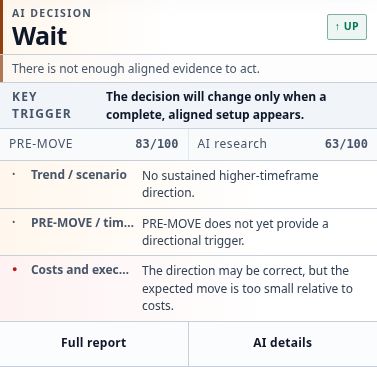
For people who want to understand the market, rather than just react to it.

QUANTUM RESEARCH / IBM QUANTUM
HOSTuvo uses real IBM Quantum hardware to explore new feature combinations and model configurations. Quantum does not bypass our quality gates: every result must pass separate OOS validation plus coverage, recall, expectancy and calibration checks.
IBM and IBM Quantum are trademarks of IBM. This describes compute access used in HOSTuvo research and does not imply an IBM partnership or endorsement.
YOUR ACTUAL WORKSPACE
A real terminal that connects market observation with reasoning. Open the detail when you need it.
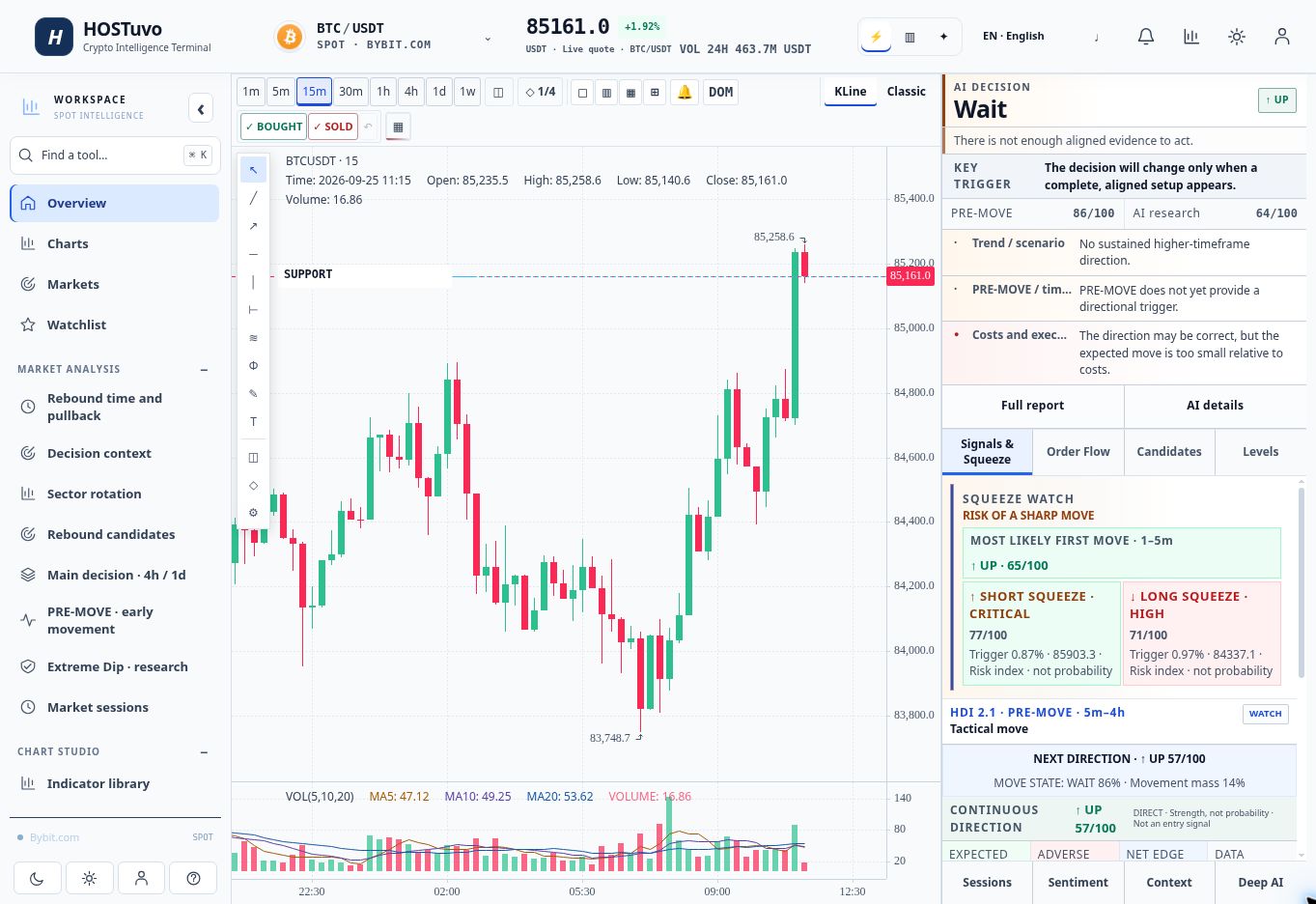
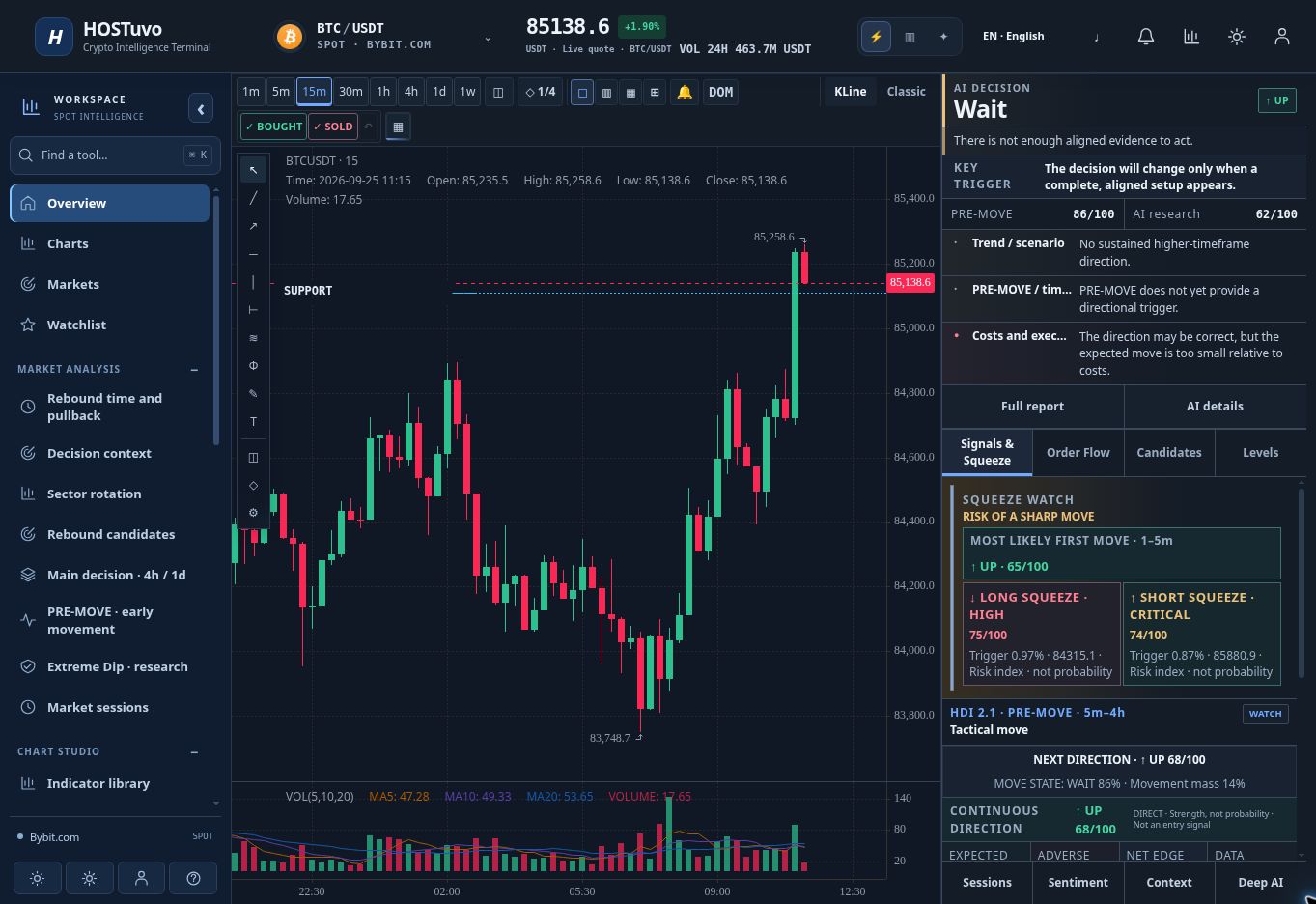
Actual HOSTuvo interface in English · captured September 25, 2026 · preview only, not a current signal.
Premium indicators on your HOSTuvo chart
Market Context Lite separates the selected timeframe, the higher trend and volatility. Spot Setups PRO separates observation, price confirmation and accepted research plans.
Trend, EMA and Bollinger bands with a plain-language explanation.
Dip and compression observations, entry filters and fixed entry, stop and target levels.
Included with Premium / PRO · Native beta · No order execution
Choose a guide, then practise with the current chart.

Learn to read EMA trends, higher timeframes and volatility in Market Context Lite, and understand why market context does not predict the next candle.
Read the guide →
Understand dip and compression observations, rebound confirmation, entry filters and fixed entry, stop and target levels in HOSTuvo Spot Setups PRO.
Read the guide →
Combine Market Context Lite and Spot Setups PRO without mistaking observation for entry. Follow a practical chart, timestamp and research-plan checklist.
Read the guide →01 / WHY HOSTuvo
Less time switching tabs. More time assessing what matters.
The radar organises the markets you monitor, shortening the path from an overview to a specific instrument. Every session starts with context.
Technical analysis, order flow, microstructure, derivatives and market context meet in one workspace. A single RSI reading need not decide the whole picture.
HOLD, missing data and unmet conditions are part of the analysis. Limitations remain visible instead of being presented as certainty.
Rankings and filters help separate situations worth watching from those that still need confirmation.
Review structure, time horizon, cost and entry conditions. A result starts an informed assessment; it is not an instruction to place a trade.
Research layers are evaluated against subsequent observations. A model can influence production only under explicit validation rules.
02 / YOUR WORKSPACE
Eight perspectives that help you ask better questions. Open the diagnostics when you need the detail.
PRE-MOVE
Radar / TOP10
Accumulation Swing
Spring Scanner
Order Flow
Self-Learning
Market Context
Execution Gate
03 / HOW IT WORKS
A diagnostic signal and an authorised setup are different states. The final decision always belongs to the user.
A MEANINGFUL DIFFERENCE
Sometimes the most useful information is that there is not enough evidence to act. HOSTuvo leaves room for that answer.
HOLD is not an absence of analysis. It can be the conclusion.
04 / THE ACTUAL PRODUCT
Actual HOSTuvo interface in English · captured September 25, 2026 · preview only, not a current signal.
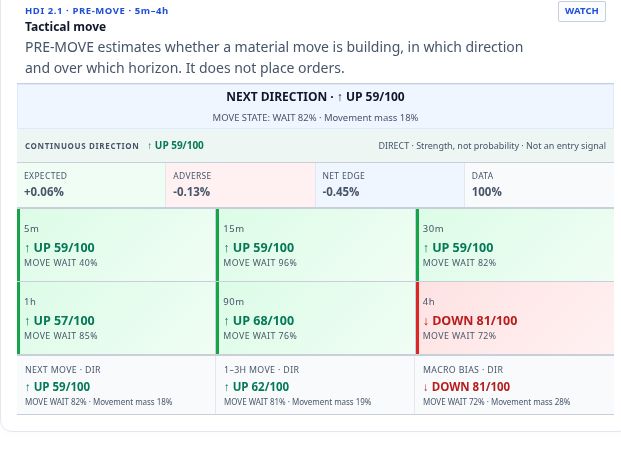
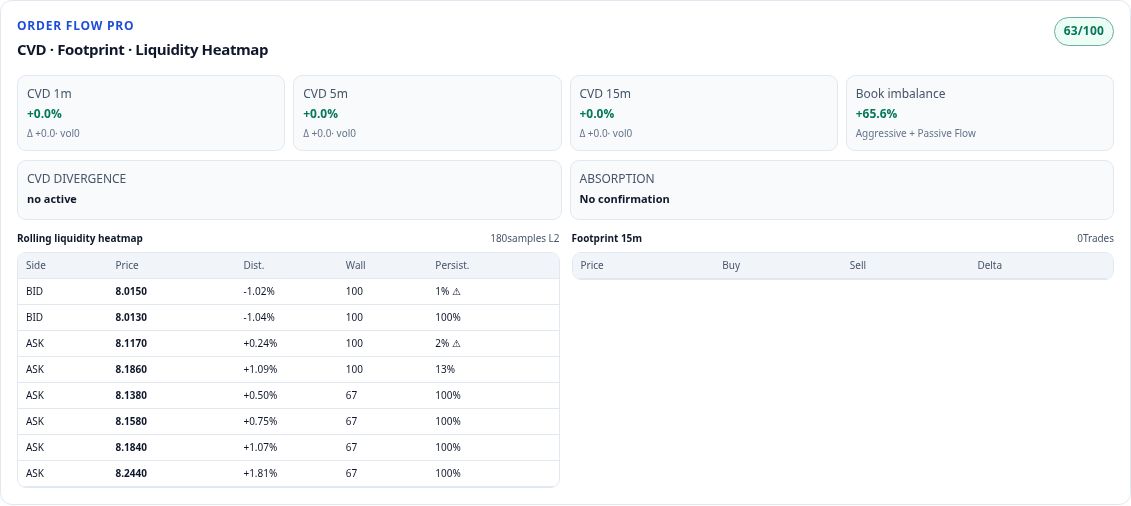
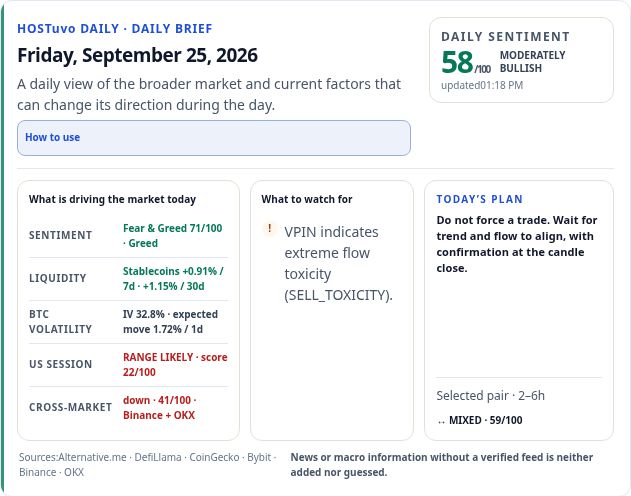
Actual HOSTuvo interface in English · captured September 25, 2026 · preview only, not a current signal.
HOSTuvo DATA API · V1
Data API in HOSTuvo PRO provides selected terminal data for your own applications, spreadsheets and dashboards. Access is read-only.
NEWS · COMMENTARY & ANALYSIS
COMMENTARY & ANALYSIS
Evaluate a crypto spot scanner using data freshness, time horizons, trading costs and visible evidence. See how to assess the HOSTuvo workflow before subscribing.
Read the guide →
Calculate how fees, spread and slippage affect a crypto spot round trip. Follow a transparent $1,000 example and check the assumptions behind break-even.
Read the guide →
CPI can reset expectations for interest rates. For crypto, the surprise versus consensus and the market reaction matter more than the headline alone.
Read more
Bitcoin dominance shows how crypto market value is distributed between BTC and the rest of the market. It does not tell you whether total market value is rising.
Read more
MiCA creates a common EU framework for crypto-asset issuers and service providers. The practical impact depends on licensing, disclosures, stablecoin rules and implementation.
Read more
Ethereum activity increasingly takes place on Layer 2 networks. Cost, liquidity, bridge security and data availability all matter when evaluating the shift.
Read moreKNOWLEDGE HOSTuvo
Sessions, macro and catalysts. CVD, L2, absorption and liquidity.
A useful research question specifies an asset, executable market, decision time and outcome window. “Will this rise?” leaves all four open. “Does a close above the previous hourly range precede a move large enough to exceed estimated round-trip costs within…
Read more
The NYSE core equity session opens at 09:30 America/New_York on its regular trading days. In Poland this is commonly 15:30, but different daylight-saving change dates create periods when the local time is 14:30. Exchange holidays and shortened sessions matter…
Read more
Headline CPI, CPI excluding food and energy, monthly changes and annual changes answer different questions. Keep the official series definition, seasonal-adjustment convention and reporting period alongside each number. A consensus estimate is an external…
Read more
Specify the reference range, timeframe and what counts as a completed break. A wick, a closed candle and several minutes of trading outside the range represent different conditions. Record how far price has already travelled when the observation becomes…
Read more
CVD accumulates signed executed volume from a defined starting point. Changing that anchor changes the displayed level, so the level itself is not comparable across arbitrary chart resets. Base-asset units and quote-currency notional answer different…
Read more
An event warning asks whether a defined amount of movement may occur within a horizon. A direction view asks which side is favoured under its own target definition. A trading decision additionally needs an executable price, costs and an invalidation…
Read more05 / HOSTuvo PRO
One flat monthly fee includes every available HOSTuvo PRO module. No extra module charges and no choice between multiple packages.
Register and confirm your email address. Creating an account does not start a paid subscription.
Sign in, open the plan section and review USD 29.99 per month before confirming payment separately.
Your account shows whether PRO is active. Once access is confirmed, open the terminal.
An account without an active PRO subscription does not include PRO tools.
29.99 / month
USD · Monthly access to HOSTuvo PRO
Any purchase requires a separate checkout confirmation. Modules depend on data availability and their validation requirements.
Questions about access or billing? admin@hostuvo.com
06 / BEFORE YOU START
A crypto market analytics terminal. It combines multiple market perspectives, organises situations to monitor, and shows the reasoning and limitations behind the analysis.
People who independently analyse spot markets and want to organise how they monitor instruments. It does not replace an understanding of risk or personal judgment.
No. The current production application runs in analysis mode with automatic orders disabled. The account panel does not require exchange trading keys.
No. Analysis can be wrong, data can be incomplete and market conditions can change quickly. We do not publish profit guarantees or unverified win rates.
Quotes use live streams and refresh mechanisms. The global Spring scan is scheduled every five minutes. Each module has its own cadence and depends on source availability; the interface shows data freshness.
There is insufficient evidence for authorised action on that time horizon. Data quality, structure, costs or missing confirmation may be the reason.
PRE-MOVE displays tactical diagnostics for 5, 15, 30, 60, 90 and 240 minutes. Read the target definition, issue time and data status for each horizon. A directional score, a three-state probability distribution and an authorised entry answer different questions. A short rebound can coexist with a weaker four-hour forecast; neither replaces the separate Accumulation Swing analysis based on 4h/1d structure.
It looks for local extremes and potential rebound structures. A ranking identifies a candidate; a place on the list is not permission to trade or a promise of upside.
Check frozen predictions against later outcomes, sample size and the same baseline over the same period. Training runs, new model files and SHADOW activity show work being performed, not proven improvement. Overlapping observations can repeat the same market move, so chronological validation matters. Research candidates gain influence only after their applicable checks; a failed candidate must not be presented as an upgrade.
HOSTuvo PRO is listed at USD 29.99 per month. Your account shows plan details, access and checkout availability. Registration alone does not start a paid subscription.
Open the plan section in your account to see the available billing controls. Read the terms before confirming a purchase. If you need help with access, billing or cancellation, contact admin@hostuvo.com.
Accounts use Supabase Auth, server-side permissions and RLS. HOSTuvo does not require exchange order keys, and Data API stores only a hash of generated API keys. No service can promise zero risk.
Selected research problems can be sent to an IBM quantum processor through the hybrid research pipeline. Its output is a candidate solution that still requires comparison with classical methods and later market observations. Completing a QPU job or matching a classical optimisation result does not prove better price forecasts. The terminal should distinguish hardware execution, validation status and actual influence on the active model.
First compare venue, quote currency, instrument type, depth and timestamp. A Bybit.com spot reference, a Bybit EU execution market and a MEXC perpetual contract are different observations. Open interest in contracts is not spot buying volume, and a funding rate is not a price forecast. Compare like with like before concluding that one panel is wrong.
A dash means the value is unavailable or unsuitable for the current view; it is not a zero and does not predict a fall. Read the observation time and status before the colour or score. A successfully loaded page can contain a slower daily macro series alongside live quotes. After changing market or interval, wait for data matching the new selection rather than relying on the previous chart.
Use the same forecast definition and a later evaluation period for the candidate and baseline. Inspect missed moves, false alarms, direction, calibration and uncertainty rather than one attractive percentage. Evaluate executable scenarios with venue-specific costs, and keep simulated price changes separate from realised results. A model may improve one horizon and worsen another; the report should expose both.
Explore HOSTuvo and bring more structure to your view of the market.